Mac · macOS 13+
Existing folders
Search local, external and available network folders together. Files remain in your existing structure.
 DruckarchivLocal model library
Local 3D printing library
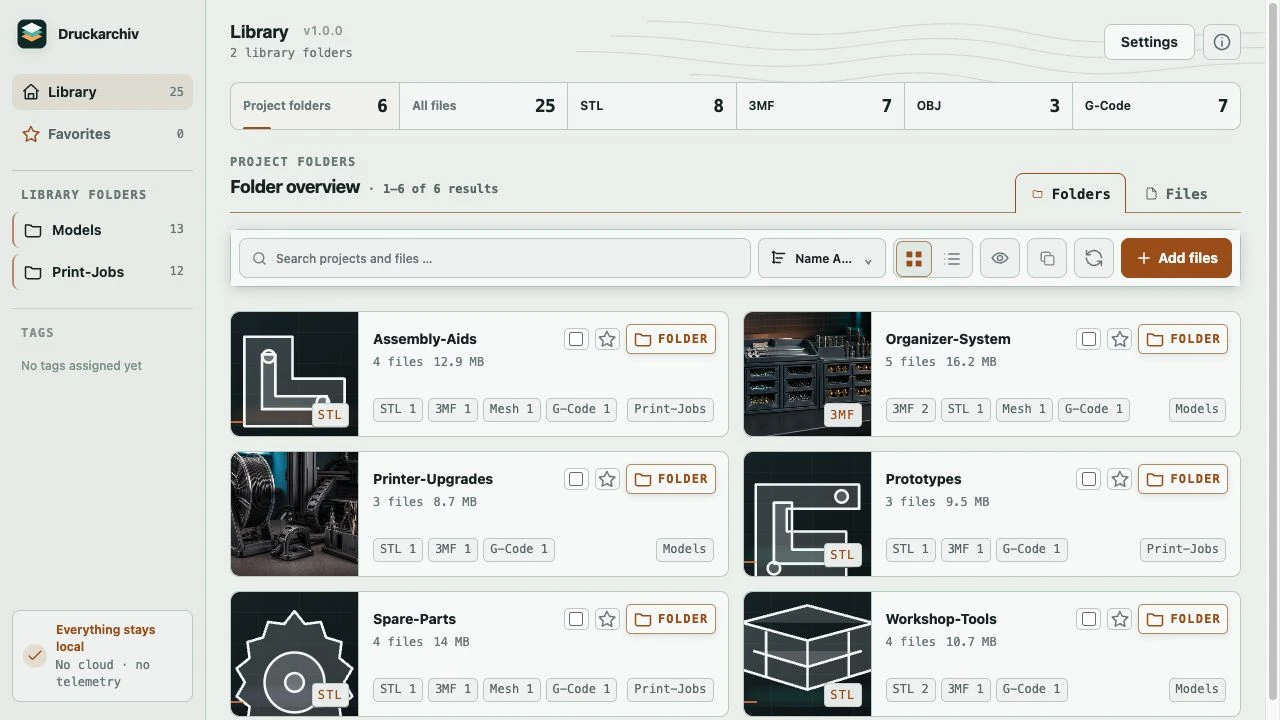
Find, preview and organize your 3D printing files locally. On the Mac, Druckarchiv works with your selected folders. On the iPad, it keeps imported copies in its own library.
Version 1.0 · Mac and iPad release in preparation
Light, dark or system appearance
Two platforms, local libraries
On the Mac, select local folders, external drives or available network folders. Their existing structure stays intact. On the iPad, use Apple’s Files picker to import copies; the originals stay in place. Libraries are separate, with no automatic synchronization.
Mac · macOS 13+
Search local, external and available network folders together. Files remain in your existing structure.
iPad · iPadOS 16+
Copy files through Apple’s Files picker and organize them in a separate local library.
From folder to print
FIND / INSPECT / ACT

Find
Move through nested folders or switch to all files. Search, format filters, favorites and pagination keep large libraries usable.

Inspect
Local thumbnails and the interactive STL, 3MF and OBJ viewer let you rotate, zoom and pan. Previews can be disabled for maximum speed.

Act
Mark files and folders as favorites and add your own tags. On the Mac, you can also hand compatible files to a separately installed OrcaSlicer, Bambu Studio, PrusaSlicer or another selected slicer.
STL, 3MF, OBJ and G-code are enabled by default. Additional formats can be organized; this does not promise 3D preview or conversion for those formats.
A library you can actually maintain
On the Mac, adding, renaming, moving and trashing entries changes real files in your selected folders. Moving and trashing require confirmation. On the iPad, imports create local copies; source files remain unchanged. Keep independent backups of important files, including files in the iPad library.
Local by design
Library scanning, previews and duplicate comparison happen on your device. Druckarchiv has no telemetry, user account or model upload. Apple purchase verification or restoration starts only when you select it and may need an Apple connection. After successful verification, a protected local record permits offline use. Updates come through the Apple App Store.
The planned Store launch
Version 1.0 is being prepared for Mac (macOS 13 or later) and iPad (iPadOS 16 or later) under a common Apple purchase. The planned one-time price in Germany is EUR 9.99. The iPad imports copies into its own library. Windows follows in a separate release.
Questions before installing
STL, 3MF, OBJ and G-code. Further mesh, CAD and reference formats can be enabled in the library settings.
No. Library scanning, previews and duplicate comparison run locally. The Store edition receives updates through the Apple App Store.
On the Mac, Druckarchiv asks for confirmation before moving real files or folders to the system Trash. Recovery may be unavailable on external or network drives. The iPad edition has no macOS Trash workflow; removing the app may remove its local library. Keep independent backups.
On the Mac, yes: selected local folders, external drives and available network folders can appear together while remaining identifiable. On the iPad, imported copies go into the app’s own local library. The devices do not synchronize automatically.
Yes. You can choose a light or dark interface, or let Druckarchiv follow your system setting. The website offers the same three options above.
No. STL, 3MF and OBJ previews are rendered directly in the app.
Version 1.0 has a hobby license for predominantly private, non-commercial use. Applicable Apple rights for Family Sharing and volume purchasing take precedence. Read the full license terms for the exact scope.